
Outlook -- Mac Calendar Display is 1 Hour Off
Instructions on using Mac Calendar
There is a bug in the Mac version of Microsoft Outlook where all events in the next week of your calendar display 1 hour later than they actually are.
This seems to happen in the "Week" (or full week) view of the calendar.
If you use the "Work Week" view, the calendar displays properly.
Click the "Home" tab to see "Work Week" and "Week" view buttons.
Here is an example screenshot of the "Week" view of a Mac Outlook Calendar.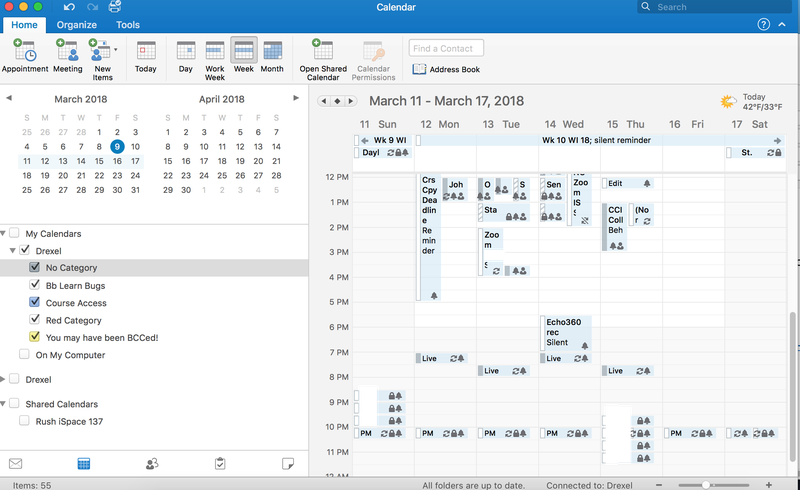
Here is an example screenshot of the "Work Week" view of a Mac Outlook Calendar.
Use the "Work Week" view for now.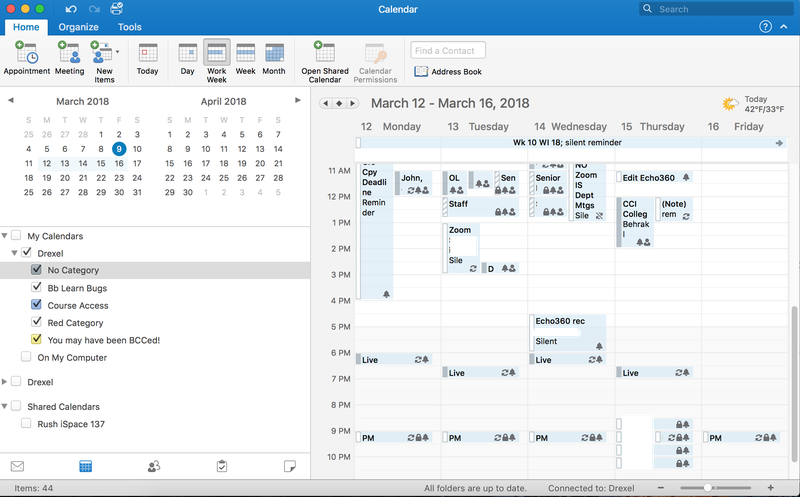
Some additional information about this issue is found at the webpage.
https://social.technet.microsoft.com/Forums/office/en-US/a43a6c67-7d02-4a62-95e5-5ff931f8f7ac/march-11-calendar-bug-outlook-mac?forum=outlook