
Discord -- Right Navigation Bar and User Search
Right Navigation Bar and User Search
Right Navigation Bar
In the top-right corner of Discord, there are several navigation options for the current server.


- Shows all active and archived threads on the current selected channel. For more info, see Discord -- Threads.

- Unmutes notifications and unread indicators from currently selected channel.

- Mutes notifications and unread indications from currently selected channel, EXCEPT mentions.

- Shows the pinned messages on the currently selected channel.

- Toggles the display of the member list panel on Discord.
- For more info on member list, see Member List Information below.
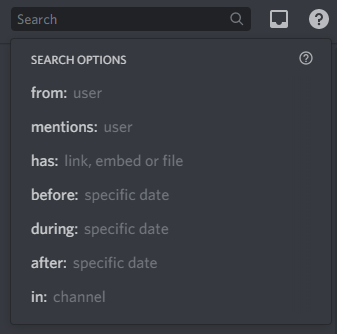
- Searches the messages on the current server.
- Search options include: from specific user, specific date, specific channel, etc.

- Shows mentions from all servers.
- Shows unread messages from all servers.

- Directs you to Discord Help Center on the browser.
- Find help for everything on Discord.
Member List Information
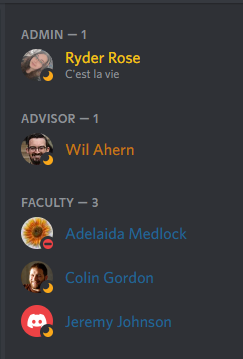
General Info
- All users in a channel will show up on the right panel.
- Offline users will always be displayed at the bottom.
Member Roles
- Users can be designated roles displayed in the order chosen by the owners of the server (i.e. Advisor, Faculty, TA, etc.).
- Within a role, users are organized in alphabetical order.
- Colors are only used to organize users with a certain role.
Channel-Specific Member
- Users who have access to a specific channel will show up on the member list.
- For example, if a channel has special permissions, only users with access to that channel will appear on the member list.