Skip to content
Drexel University College of Computing & Informatics Technology Services and Support

Zoom -- Claim Host Role during a Meeting

How to claim host role during zoom meeting.

If you are not logging in as a host, and instead first clicking a link to join Zoom as a participant, and then want to become a host, here's what to do.

  1. Click "Participants" at bottom of Zoom.
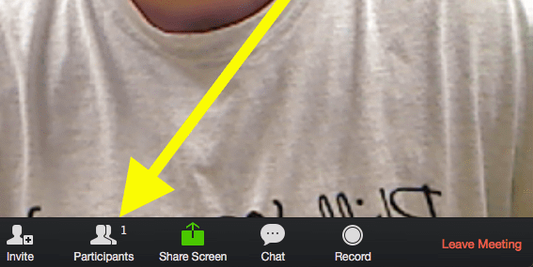
    Participants icon in Zoom meeting window v2.png
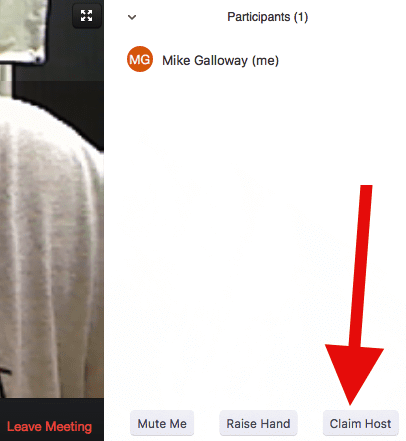
  2. Click "Claim Host"
    Claim Host button in Participants panel in Zoo v2.png
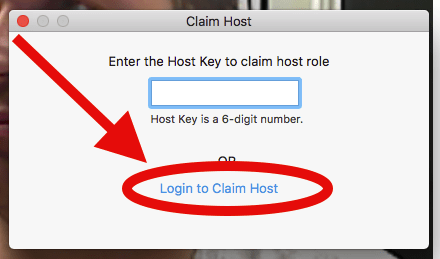
  3. Click "Login to Claim Host."
    Login to Claim Host link Claim Host window v2.png
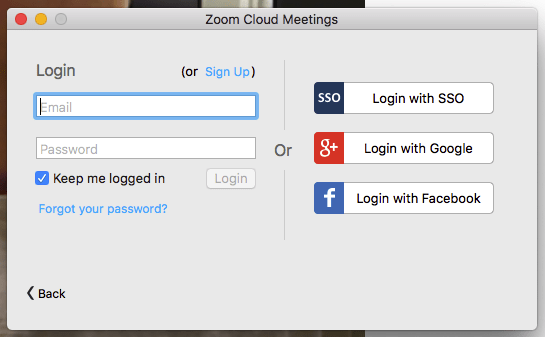
  4. Click "SSO Login with SSO."
    Zoom host login window v2.png

  5. Enter "drexel" (no quotes) next to "zoom.us."

  6. Then click "Continue."

You are now the "host" (and can record the meeting).

And "Host" now appears next to your name in the "Participants panel.
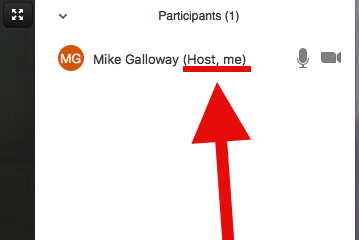
Host label for host in Participants panel in Z v2.png


Still stuck?

The CCI Commons help desk can walk you through it.

Mon–Fri
8am–9:30pm
Sat
9am–6pm
Sun
12pm–5pm

Need help?

The CCI Commons help desk can walk you through it.

Mon–Fri
8am–9:30pm
Sat
9am–6pm
Sun
12pm–5pm