Skip to content
Drexel University College of Computing & Informatics Technology Services and Support

How to Join CCI's New Student Servers

This article has instructions on how to join our new CCI Dragons Discord Servers

1. Check your email for an invite to the server. This will include the link you need to join and your keycode. The email will look like the email below

*Be sure to check your spam folders 
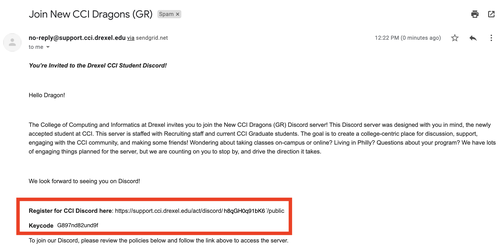
New Dragon Email to Join Discord Servers


2. Copy the link into your web browser

3. You will be prompted to answer if you have a Discord account
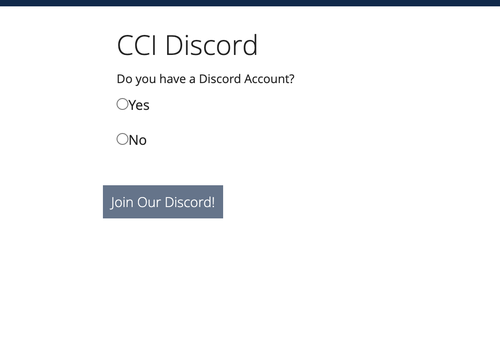
Do you have Discord


4. After clicking "yes" you will be prompted to accept our "Code of Conduct" and Policies at the bottom of the page. The "Join Our Discord" button should turn to a dark blue when you have checked both boxes
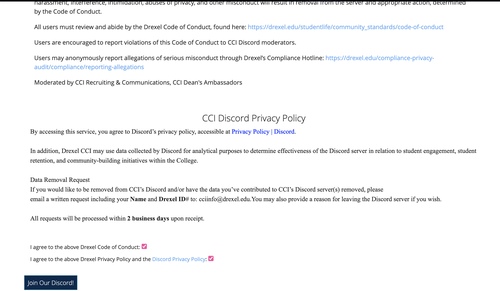

code of conducts


6. Next you will be prompted to click "Authorize" 
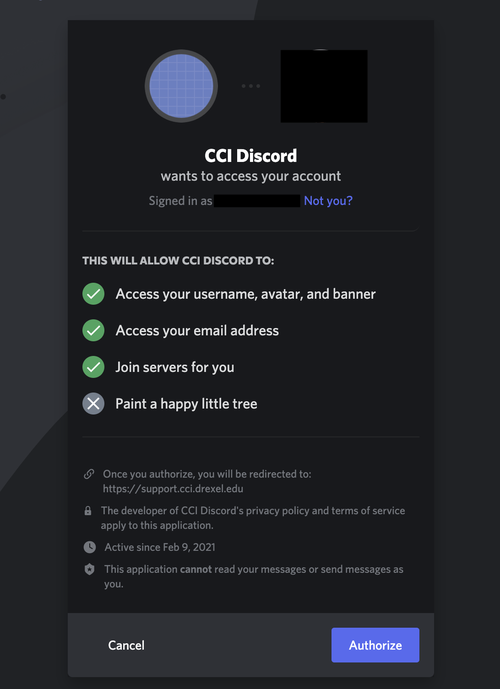
Step4.png


7. You will now be asked to provide the keycode from the email. The keycode is located below the invite link 
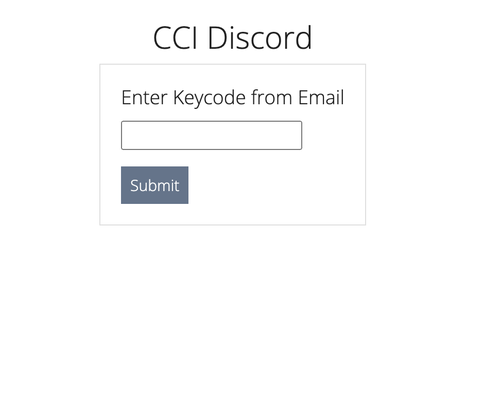
keycode


8. After clicking "Submit" you will be redirected to Discord 


If you have any issues after completing the above steps, check out this page for troubleshooting options

Still stuck?

The CCI Commons help desk can walk you through it.

Mon–Fri
8am–9:30pm
Sat
9am–6pm
Sun
12pm–5pm

Need help?

The CCI Commons help desk can walk you through it.

Mon–Fri
8am–9:30pm
Sat
9am–6pm
Sun
12pm–5pm